Seputar Jawa: The Digital Javanese Script Keyboard System
College StudentNewsSDGSStudentStudent's ActivityStudent's Work Monday, 13 April 2026
Typing Javanese script on digital devices is often not as easy as imagined. Instead of displaying the expected letters, the screen often displays a row of blank squares or tofu, a sign that the font is not legible. This problem is not isolated. In addition to font limitations, the differences in typing systems between the Latin alphabet and Javanese script also make it difficult for users to adapt. Furthermore, keyboard layouts vary across operating systems, from Windows to Macintosh to Android. This directly complicates the use and preservation of Javanese script, especially in the digital realm.
A number of Javanese script fonts are already available and can be used freely, such as NyK Ngayogyan and NyK Ngayogyan Jejeg, developed by the Yogyakarta Special Region Cultural Office. However, the problems don't stop at visual appearance. Without a uniform keyboard system, users continue to face obstacles in their daily typing practices.
This situation prompted the development of a Javanese script keyboard system based on the Indonesian script keyboard (SNI 9048). This system was designed with reference to the Serat Wulangreh manuscript as a cultural basis, while also being adapted to the needs of use on various digital devices. Through this standardization, it is hoped that uniformity in typing Javanese script will be achieved, eliminating the need for users to adapt to different systems.
This keyboard system is now available for various devices and is freely accessible to the public. Users can download and install it according to their operating system, whether Windows, Macintosh, or Android. The Javanese script keyboard system can be downloaded from https://wongsayuk.webnode.page/my-work/ or https://wongsaayuk.webnode.page by selecting the download menu. On the page, there is a "Javanese Aksara Keyboard" section, then select the SNI Nataksara system in various formats depending on the device: .exe file for Windows, .dmg file for Macintosh, and .apk file for Android.
After downloading and installing, users are advised to restart their device if the system is not immediately usable. An installation guide (pitoedoeh) is also provided to facilitate the installation process and ensure optimal system use.
Once the system is installed, understanding the keyboard layout is the next important step. Users need to understand the differences between the SNI 9048-based system and the device's native system, particularly on Windows devices. These differences can be seen in the image below.
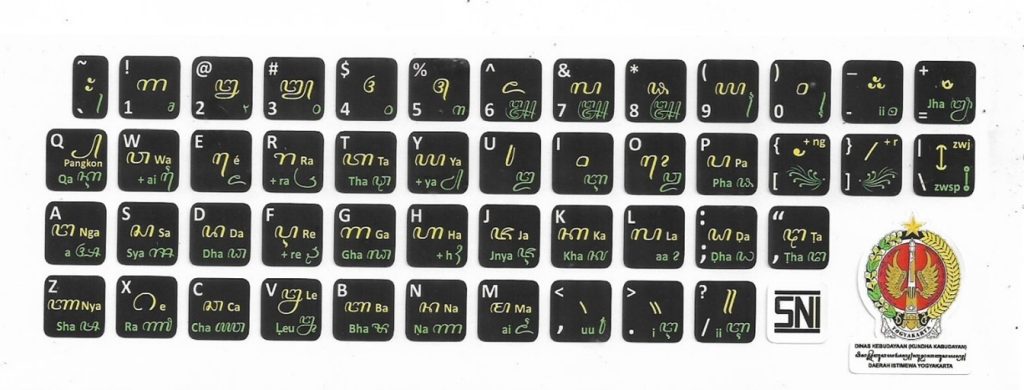
Javanese script keyboard version SNI 9048
Downloaded from Javanese script keyboard version SNI 9048, by S.A. Prasaja, n.t. wongsayuk (https://wongsayuk.webnode.page/my-work/).
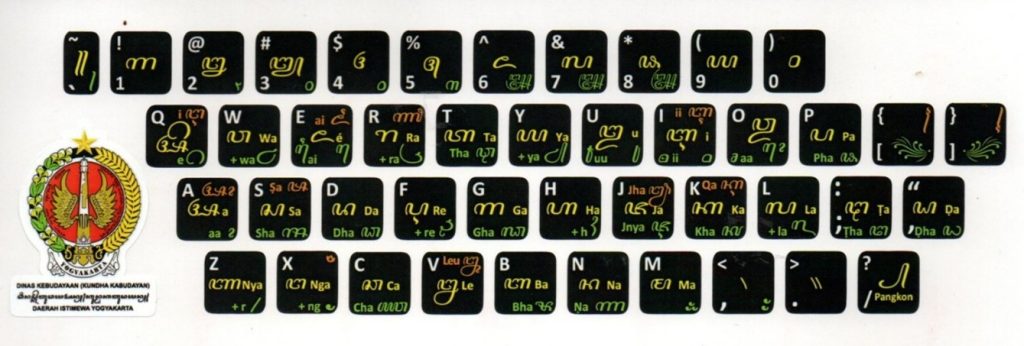
Javanese script keyboard version Windows
Downloaded from Javanese script keyboard version Windows, by S.A. Prasaja, n.t. wongsayuk (https://wongsayuk.webnode.page/my-work/).
The implementation of this standardized keyboard system is a crucial step in addressing the various technical challenges users have faced. Furthermore, the presence of Javanese script in the digital space serves not only as a visual element but also as part of efforts to maintain cultural continuity amidst technological advancements.
Ultimately, preserving Javanese script is not simply a matter of maintaining it; it also requires the courage to develop and adapt it to the times. Continuous support from various parties is key to ensuring that Javanese script not only remains alive but also remains present and empowered within the ever-changing digital ecosystem.
Author : Haryo Untoro
Editor : Haryo Untoro
Bibliography
Prasaja, S.A. (t.t.) Papan Tombol Aksara Djawa Versi SNI 9048. Wongsayuk. https://wongsayuk.webnode.page/my-work/
Prasaja, S.A. (t.t.) Papan Tombol Aksara Djawa Versi Windows. Wongsayuk. https://wongsayuk.webnode.page/my-work/